Frequently asked questions
Everything about using iMemo, from your first recording to managing your subscription. Can't find it? Write to hello@imemoapp.com.
Getting started
Can I use iMemo on another device?
I would like to use my Pro account on my tablet. How can I do that?
Yes! You can use iMemo across multiple devices through your store account. No sign-in required in iMemo.
🍎 Apple Devices (iOS) If you purchased iMemo on the App Store, simply download iMemo on any iPhone or iPadthat uses the same Apple ID. Your subscription will be recognized automatically.
🤖 Android Devices If you purchased iMemo on the Google Play Store, simply download iMemo on any Android phone or tablet linked to the same Google account. Your subscription will be recognized automatically.
💡 Subscription not showing up? If your subscription isn’t recognized automatically on either device:
- Go to the Menu on the home screen.
- Tap Restore Purchase.
Your subscription will be restored right away.
How can I reach my recordings?
To access your recordings, simply tap the ‘Save’ button once you have completed a recording.
iMemo will then automatically save the auido to app, making it easily accessible for future use.
How can I try iMemo for free?
Trying iMemo for free is simple! If you’re not yet subscribed to any of our plans, you can still explore iMemo’s features.
You are allowed to create one project and use our AI Summarize two times without a subscription. This offers the perfect opportunity to experience what iMemo can bring to your productivity and creative process.
What is the maximum number of projects I can create?
If you are a Pro, you can create unlimited projects! 🎉
If you are not a Pro user and you’d like to try iMemo before becoming Pro, you will be limited to one project.
Transcription and translation
Can I display transcript in 2 languages at the same time?
I’d love activate dual language feature to understand better
You can view two languages side by side in your project! Especially perfect for language learners, multilingual professionals, and anyone working across languages.
Here’s how to use it:
1⃣ Make sure your project is already transcribed. 2⃣ Open your project and tap the Language section at the top.
3⃣ Tap Add New Language and transcribe your project in the second language. 4⃣ After selecting the second language, enable “Show Both Languages” and tap Translate.
Already have a second language? Just tap Language → Display Secondary Language and choose the one you’d like to show.
How many times can I use the AI Summarize at most?
If you are a Pro, you can create unlimited AI summarizes! 🎉
If you are not a Pro user, you can try the AI Summarize 3 times.
Privacy and security
Can anyone see my audios and scripts?
Your privacy is of utmost importance to us.
At iMemo, we are unable to access any content on your phone, including your videos and scripts. Therefore, only you have visibility and control over who sees your content.
Subscription and payments
What should I do if I’m having payment issues?
If you’re experiencing payment issues, we recommend the following steps:
- Verify that your payment information is up to date in the respective payment system profiles – Apple or Google.
- Confirm that the card associated with your account is valid and has not expired.
- If you’re using a new payment method, you may need to call your bank for authorization.
- Last but not least, check that you have a stable internet connection before completing the transaction.
If you continue to experience problems after following these steps, please reach out to Apple Support or Google Support directly, as they handle all payment processing for iMemo.
You can also reach us via chat support, we are always happy to help 💜
What’s included in each subscription plan?
💜 You can use AI Summarize unlimitedly. 💜 You can create as many projects as you want.
Are there any differences between the subscription plans?
The features and privileges offered across our subscription plans are consistent.
They differ only in terms of subscription duration and the corresponding pricing.
Longer subscriptions, such as the one-year plan, offer the most value from a cost perspective.
How can I change my subscription plan?
iMemo is not authorized to do anything about the subscriptions.
To change the subscription plan:
For iOS: Go to your phone’s homepage, go to Settings> Your Apple ID> Subscriptions and you will see iMemo in the list, select it. You can see all the subscription plans from there and select one of them.
For Android: Open the Google Play app, tap the profile icon at the top right, tap “Payments & subscriptions” and then Subscriptions. Select iMemo> Manage> Update.
How can I get a refund?
We are sorry to see you go 🙁
If you have any problems with the app, please reach us via support chat on the app or email: hello@imemoapp.com
If you still want to get a refund, here’s the instructions:
For iOS Devices – Apple
Unfortunately, we are not authorized to give refunds, only Apple can.
Here are the instructions: https://support.apple.com/en-us/HT204084
For Android Devices – Google
If you like to get a refund from Google, here are the instructions: support.google.com
How can I unsubscribe?
iMemo is not authorized to do anything about the cancellation of subscriptions.
To cancel the subscription:
iOS: Go to your phone’s homepage, then go to Settings> Your Apple ID> Subscriptions and you see iMemo in the list, you can cancel the subscription from there.
For Android: Open the Google Play app. At the top right, tap the profile icon. Tap Payments & subscriptions and then Subscriptions and you see iMemo in the list. Tap Cancel subscription.
Support
How to report an error
If you are having problems with the app and would like to contact the support team, click the ❓ button on the top right corner. This new page will open up:
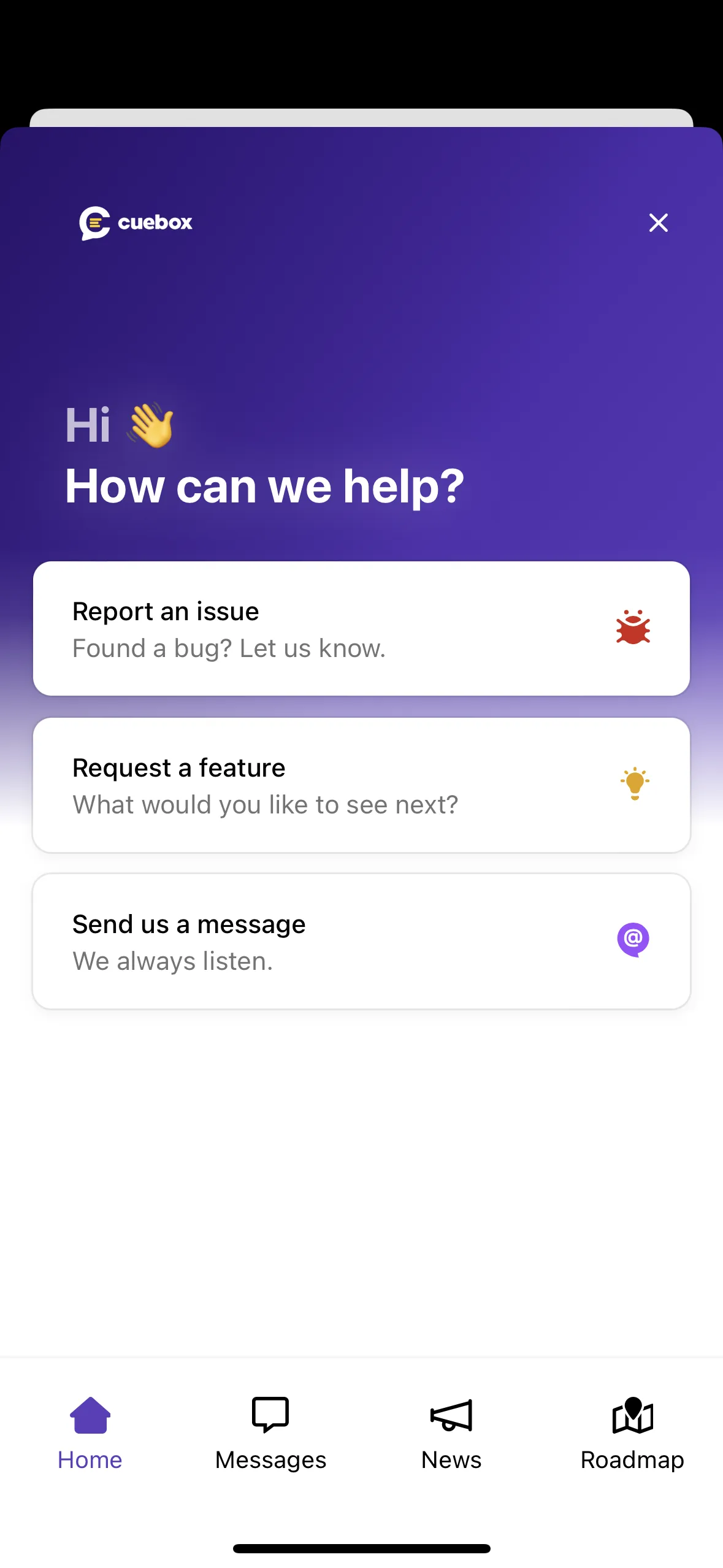
Then you can select “Report an issue” if you like to report a bug. You can also send us a message and request a feature, we always listen💜
How to reach the support team
If you are having problems with the app and would like to contact the support team, click the ❓ button on the top right corner. This new page will open up:
You can always send a message and talk to real people on chat. You can also request a feature, we always listen💜
No match. Try another word or ask us.