The average professional spends 21.5 hours per week in meetings — and roughly half that time trying to remember what was decided. Manual note-taking pulls you out of the conversation exactly when you need to be paying attention. In 2026, there’s a better way.
This guide covers everything you need to know about taking meeting notes automatically — whether you’re on Zoom, Google Meet, or Microsoft Teams. You’ll also find a free meeting minutes template you can use right now, and a step-by-step walkthrough using iMemo.
📌
In this guide you’ll learn:
Why manual notes fail → The 3 methods for automatic meeting notes → Step-by-step setup for Zoom, Google Meet & Teams → A free meeting minutes template → 5 expert tips for better AI notes
Why Manual Note-Taking Is Costing You More Than You Think
When you’re typing notes during a meeting, you’re doing two cognitively demanding tasks simultaneously: listening and writing. Research consistently shows that divided attention reduces comprehension. You end up with fragmented notes and a blurry memory of the discussion.
The cost goes beyond focus. Consider:
- A 1-hour meeting often takes another 45–60 minutes to clean up and distribute notes
- Action items captured verbally are forgotten or misattributed 30% of the time
- Remote meetings on Zoom and Google Meet make it even harder — you’re managing mute, screen sharing, and chat simultaneously
Automatic meeting notes solve all of this. Let an AI handle the transcription while you focus on the actual conversation.
3 Methods to Take Meeting Notes Automatically
There are three main approaches, each with different tradeoffs:
📱 Mobile AI Recorder
Record audio on your phone using an app like iMemo. No bots, no integrations needed — works with any platform or in-person meeting. Best flexibility
🔌 Platform Built-In
Zoom, Google Meet, and Teams all offer native transcription — but usually require paid plans and a bot joining your call. Native integration
🤖 Third-Party Bot
Tools like Otter.ai send a visible bot into your meeting. Works well but can feel intrusive — participants notice the bot joining. Bot-dependent
💡iMemo’s approach: no bots, full privacy
iMemo records audio directly on your device without joining the call. No “Bot has joined” notifications, no awkward moments — and it works even for in-person meetings, phone calls, and interviews. Learn more about how iMemo works →
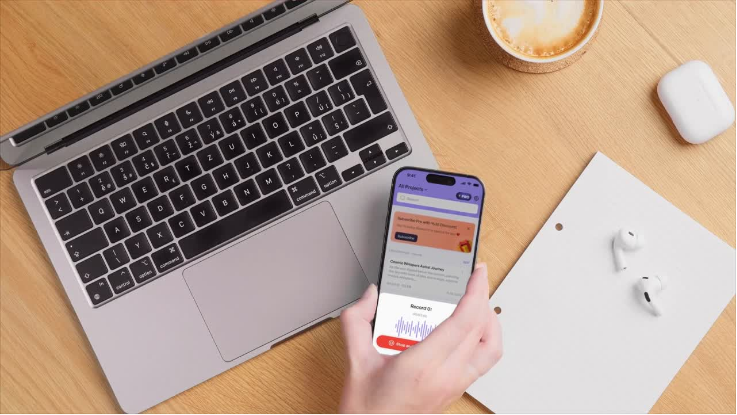
Automatic Zoom Meeting Notes: Step-by-Step
Getting Zoom meeting notes automatically is easier than most people realize. Here’s how to do it with iMemo — no Zoom Pro plan required so you can save money.
1. Download iMemo on your iPhone or Android
Install iMemo from the App Store or Google Play. Directly go in to the app, no sign in required.
2. Open iMemo before your Zoom call starts
Tap the record button in iMemo. Place your phone near your laptop speaker, or use a Bluetooth headset to capture both sides of the conversation clearly.
3. Join your Zoom meeting as normal
No bots join. No one on the call sees anything different. You can be fully present — ask questions, lead discussions, take charge — while iMemo quietly captures everything.
4. Stop recording when the meeting ends
Tap stop and save in iMemo and click transcription. The app immediately begins AI transcription — typically within 1–2 minutes for a 3-hours meeting.
5. Review your AI summary, action items, and transcript
iMemo generates a structured summary with key decisions, action items attributed to each speaker, and a full searchable transcript. Share it with your team in one tap as pdf or txt file.
Google Meet Meeting Notes: What Works Best in 2026
Google has invested heavily in Google Meet meeting notes. If you’re on a Google Workspace Business Standard plan or higher, you get a built-in “Take Notes for Me” feature powered by Gemini AI.
Here’s a quick comparison:
| Method | Cost | Works on Free Plan | No Bot |
|---|---|---|---|
| iMemo | Free / Pro | ✓ Yes | ✓ Yes |
| Google Meet (Gemini) | Workspace plan required | ✗ No | ✓ Yes |
| Otter.ai | Free / Paid | ✓ Yes | ✗ Bot joins |
| Notta.ai | Free / Paid | ✓ Limited | ✗ Bot joins |
For anyone on the free Google Workspace tier — or for meetings where you don’t want a visible bot — iMemo is the most flexible solution for automatic Google Meet transcription.
Microsoft Teams Meeting Notes: Your Options Explained
Microsoft Teams has its own built-in transcription through Copilot, but it requires a Microsoft 365 Copilot license — which can run $30/user/month. For teams that can’t justify that cost, or for individual contributors, there’s a simpler path.
For automatic Microsoft Teams meeting notes without a Copilot license:
- Use iMemo to record audio during the Teams call (same method as Zoom above)
- Teams’ native meeting recording (available on most M365 plans) saves a video file — you can import this audio into iMemo for transcription
- iMemo supports audio file imports, so you can drop any recording in and get a transcript + summary
⚠️ Check your company’s recording policy for in any cases. Note that iMemo does not backup your recordings. When you delete them on your mobile phone or tablet, they are gone forever.
Many organizations have policies around recording meetings. Always inform participants before recording any call — and check with your IT or HR team if you’re unsure about compliance.
Real-World Example: How a Project Manager Saves 6 Hours a Week
📖 Real-World Example
Sarah Johnson, Project Manager at a 60-person SaaS company
Sarah runs four meetings per week — a Monday standup, two client check-ins, and a Friday retro. Before using an AI note-taker, each meeting generated about 45 minutes of post-work: organizing rough notes, writing up action items, and sending the recap email.
She started recording with iMemo in January 2026. The app captures her Zoom and Google Meet calls silently — no bot, no platform changes. After each meeting, iMemo delivers a structured summary within two minutes. Sarah reviews it, makes any small edits, and hits send.
The result: what used to take 3 hours of post-meeting admin now takes 20 minutes total across all four meetings — a saving of roughly 6 hours every week.
“The action items are the biggest win,” she says. “iMemo attributes each one to the person who said it. No more ‘wait, who was supposed to do that?'”
⏱️ Time saved: ~6 hours/week · 24 hours/month · 288 hours/year
5 Tips for Better Automatic Meeting Notes
- Start recording before the meeting begins. Capture the informal pre-meeting chat — that’s often where the most useful context is established.
- State names at the start. When attendees briefly introduce themselves, AI transcription becomes dramatically better.
- Use a consistent agenda structure. AI summarization is sharper when meetings follow a predictable format — it learns what’s a “decision” vs. background discussion.
- Review action items immediately after. AI is excellent at extracting action items but may miss nuanced follow-ups. A 1-minute scan right after the call catches anything important.
- Use the translated summary for international teams. iMemo supports 120+ languages. Send the English summary and the Spanish/French/German translation in one tap — no extra work required.
Frequently Asked Questions
Q1: Can I take meeting notes automatically without a bot joining the call?
A: Yes. Apps like iMemo record audio directly on your phone or computer without sending a bot into the meeting. This means no awkward “XYZ Bot has joined” notifications and full compatibility with any platform — Zoom, Google Meet, Teams, or even in-person meetings.
Q2: How do I get automatic Zoom meeting notes?
A: Open iMemo before your Zoom call, start a recording, and let the app capture the audio. Once the call ends, iMemo transcribes the audio and generates an AI summary with action items — no manual typing required. You can also use Zoom’s built-in transcription if you’re on a paid Zoom plan.
Q3: Does Google Meet have automatic note-taking?
A: Google Meet offers a built-in “Take Notes for Me” feature for Google Workspace Business Standard and above, powered by Gemini AI. For a free alternative that also works on any Google plan, use iMemo to record the audio on your device and get an AI-generated transcript and summary.
Q4: What should be included in a meeting minutes template?
A: A solid meeting minutes template should include: the meeting date and time, attendee names and roles, agenda items discussed, key decisions made, action items with owners and due dates, open questions, and the next meeting date. iMemo’s AI automatically extracts all of these from your recording.
Q5: Is there a free AI meeting notes app?
A: Yes. iMemo offers a free trial that includes unlimited projects with audio recording and AI transcription, summarization. The free plan is ideal for occasional limited meetings, while the Pro plan unlocks unlimited recordings, translations in 120+ languages, and advanced AI summaries with action items.
Q6: Does Microsoft Teams have automatic meeting notes without Copilot?
A: Teams’ native AI notes require a Microsoft 365 Copilot license. Without it, your best option is to use iMemo to record the call on your mobile device, or import an audio file from Teams’ meeting recording feature into iMemo for automatic transcription and summary.
The Bottom Line
Taking meeting notes automatically in 2026 isn’t a luxury — it’s how productive professionals protect their time and attention. Whether you’re on Zoom, Google Meet, or Microsoft Teams, the tools exist today to let AI handle the transcript so you can focus on what actually moves projects forward: thinking, deciding, and connecting.
The best starting point? Download iMemo, record your next meeting, and see what an AI-generated summary looks like compared to your manual notes. Most people never go back.
Try iMemo free — no credit card required. Record, transcribe, and summarize your next meeting automatically. iOS & Android.
✍️ iMemo Editorial Team
Productivity & AI Research
The iMemo team writes about AI productivity, meeting culture, and the future of work. iMemo is a mobile-first AI note-taking app trusted by students, professionals, and journalists in 120+ countries.
Keep Reading
8 Unique Use Cases To Use iMemo AI Note Taker
Productivity Hacks for Busy Professionals
© 2026 iMemo · Privacy Policy · Terms · Blog